Service Canada

Project Context
Service Canada embarked on a comprehensive digital transformation of their benefits platform—a central hub where Canadians access social security benefits such as OAS/GIS, EI, and CPP. As a high-priority initiative under Employment and Social Development Canada, the project demanded a refined user experience, a strong visual language, and an intuitive design system to ensure both accessibility and scalability.
Our team was brought in to provide senior-level UX direction, beginning with a heuristic evaluation of the existing design to pinpoint usability gaps and repurpose familiar, valued assets. Through stakeholder interviews and baseline user testing, we identified key areas for enhancement, including the need for interfaces that are more senior-friendly.
Collaborating closely with oversight on a number of product teams, we established repeatable design patterns and ensured adherence to UX best practices. Ultimately, our efforts led to a cohesive design system that significantly improved the platform's effectiveness while meeting the high standards expected of a national government service.
Role
Senior UX/UI Designer, Product UX Lead
Collaborators
Product Owners, Creative Director, Business Analyst, Developers, Subject Matter Experts
Project Timeline
Methods and Tools
Design Thinking, Design System, Figma, Miro, Microsoft, Adobe, Jira
Process
We followed a structured design thinking approach to elevate the Service Canada benefits platform’s usability, accessibility, and overall user experience, with a particular focus on building a robust design system that seamlessly aligned with the Canada.gc.ca style guide and the Digital/Web Experience Toolkit.
In the discovery phase, we conducted stakeholder interviews, baseline user testing, and extensive service blueprinting and journey mapping to gain a holistic understanding of the entire benefits ecosystem. This process helped us identify key pain points such as confusing navigation, inconsistent design patterns, and accessibility gaps, which we distilled into targeted problem statements focused on enhancing usability, content clarity, and scalability.
During ideation, the UX team engaged in collaborative brainstorming sessions and sketching exercises to generate innovative solutions while prioritizing the creation of a cohesive design system. We developed low-fidelity wireframes and advanced to high-fidelity prototypes that streamlined user flows, improved visual hierarchy, and integrated repeatable design patterns in strict accordance with government digital service standards.
Comprehensive usability testing with a diverse range of users validated our design choices, leading to refinements in navigation, visual coherence, and content presentation. Ultimately, this iterative process delivered a modern, engaging, and scalable digital experience that met the high standards expected of a national government service and provided a clear roadmap for the future evolution of the social benefits so important to Canadians.



Discovery
The discovery process for the Service Canada benefits modernization project was a thorough and comprehensive effort aimed at understanding the entire benefits ecosystem and aligning the digital solution with government standards. We began by conducting stakeholder interviews with government officials, technical teams, and beneficiaries to gather insights on current pain points and aspirations.
In parallel, baseline usability testing and extensive service blueprinting were performed to map out the end-to-end user journey—from initial access to benefits management—highlighting critical touchpoints and workflow inefficiencies.
Additionally, we reviewed the Canada.gc.ca style guide and the Digital/Web Experience Toolkit to ensure that our design approach would seamlessly integrate with existing government digital services. These activities collectively defined the problem space, informed key design requirements, and set the foundation for an intuitive, accessible, and scalable benefits platform.

Design Requirements
Brand Consistency & Compliance
The interface had to adhere strictly to the Canada.gc.ca style guide and Digital/Web Experience Toolkit, ensuring a unified and professional government digital identity.
Scalability & Flexibility
A modular design system was essential to accommodate future feature expansion and ensure consistent performance across multiple platforms, including desktop and mobile.
Robust Usability & Accessibility
Informed by baseline user testing and heuristic evaluation, the design had to meet or exceed WCAG 2.1 AA standards, ensuring that all users, regardless of ability, could effectively navigate and interact with the platform.
User-Centered Experience
The design needed to be intuitive and accessible for a diverse user base, particularly addressing the needs of seniors and other vulnerable populations, with clear navigation and easily digestible content.
Efficient Workflow & Task Management
The platform required streamlined processes for benefits access—from initial sign-up to benefits management—with minimal friction and clear calls-to-action.
Integration of Existing Assets
The solution leveraged existing, beloved assets from prior initiatives while enhancing them with modern UX best practices to meet the high standards expected of a national government service.
Use Cases
To ensure an intuitive and efficient digital experience, we conducted stakeholder interviews, user research, and workflow analysis to define key use cases. This process identified critical user journeys, accessibility requirements, and content needs.

Retiree:
A retired public servant in their late 60s uses the platform to manage Old Age Security (OAS) and Guaranteed Income Supplement (GIS) benefits. This user needs clear, legible content, straightforward navigation, and intuitive guidance to ensure a seamless experience without being overwhelmed by technical details.

Unemployed Applicant:
A recently laid-off individual in their mid-30s relies on the platform to file an Employment Insurance (EI) claim. This user values a step-by-step, guided process with real-time status updates and accessible self-help resources that simplify complex procedures during a challenging time.

Working Professional:
An active contributor to the Canada Pension Plan (CPP) in their early 40s uses the platform to monitor contributions and plan for future benefits. This user requires a data-rich dashboard with clear analytics and projections to support financial planning and provide detailed insights into benefit accrual.

Government Administrator:
Wants to attract and evaluate young talent but struggles to connect with the right candidates. The recruitment portal allows targeted job postings, applicant tracking, and skill-based matching, making it easier for employers to find and engage with entry-level job seekers.

Caregiver/Family Member:
A caregiver in their mid-50s assists an elderly family member in navigating the benefits process. This user requires an intuitive, guided workflow with easily accessible instructions and support features that help non-technical users confidently manage benefits.
Ideation
During the ideation process for Service Canada, our cross-functional team engaged in intensive brainstorming sessions that leveraged “How Might We” statements to frame our key challenges, followed by rapid lightning sketches to visualize innovative ideas quickly.
This iterative approach allowed us to explore a variety of concepts focused on enhancing usability, accessibility, and user engagement, ultimately guiding us toward solutions that would deliver a cohesive, intuitive experience for young job seekers, educators, and other stakeholders.

Prototyping
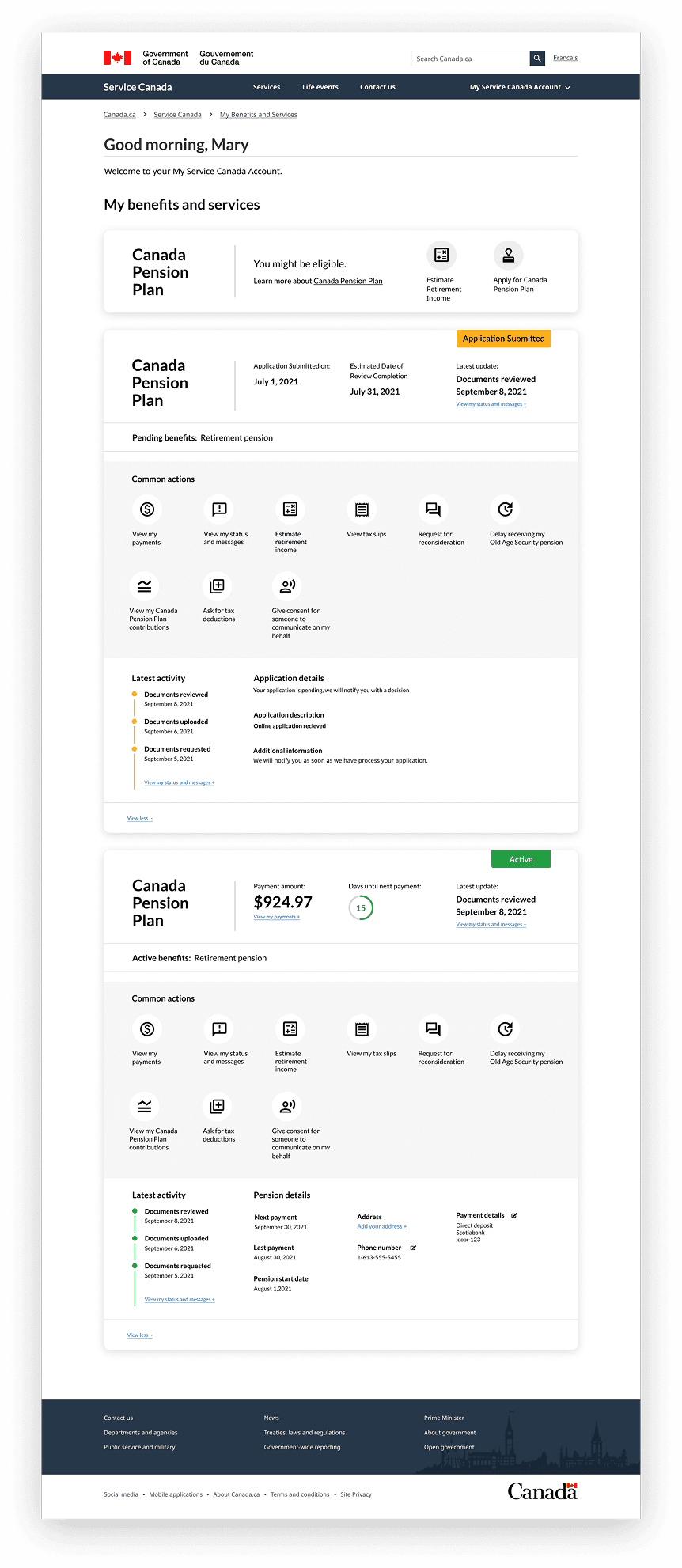
The prototyping process for the Service Canada project was an iterative endeavor aimed at enhancing the usability and accessibility of benefits landing pages and cards. Initially, the team conducted a baseline study to identify usability gaps by testing the existing service with users. Insights from this research informed the development of prototypes that adhered to the Canada.ca design standards, ensuring consistency and user-centric design. These prototypes underwent rigorous user testing, allowing for iterative refinements based on feedback. Upon validation, the refined designs were implemented, resulting in a seamless and intuitive user experience for Canadians accessing their benefits.


Design System
Managing the Service Canada design system involved a comprehensive, iterative process to ensure that every digital touchpoint met stringent government standards while providing an intuitive, accessible user experience. I began by aligning our initial research with the Canada.gc.ca style guide and the Digital/Web Experience Toolkit, setting a clear foundation for the visual language and component library. Working closely with cross-functional teams—designers, developers, and content strategists—I established a cohesive set of guidelines and repeatable design patterns that served as the backbone for the benefits platform.
Throughout the project, I oversaw regular design reviews and audits to identify inconsistencies and gather feedback from usability testing, ensuring that the design system evolved in line with user needs and technical advancements. I maintained detailed documentation and managed a centralized component library, which streamlined the implementation of the design system across various projects. This process not only guaranteed compliance with government digital service standards but also significantly enhanced the platform’s efficiency, scalability, and overall user satisfaction.

Usability Tests
I conducted moderated usability sessions with a diverse mix of users—ranging from seniors and unemployed applicants to government administrators and IT support staff—to validate our prototype’s performance against real-world tasks like applying for OAS, filing EI, and checking CPP status.
Each session included task completion, think-aloud feedback, and standard metrics (success/error rates, time-on-task, satisfaction scores). We ran two rounds of testing using high-fidelity prototypes and collected qualitative observations alongside quantitative data. This approach mirrors Service Canada Labs’ early-engagement model, which emphasizes public feedback to prevent usability issues before launch.
Findings
Visual Inconsistencies Undermined Trust
Several testers flagged inconsistencies—like buttons changing colour or layout shifting between sections (e.g. OAS vs. CPP vs. EI pages). These inconsistencies confused users and made the platform feel less official. This reinforced the need for a strict design system aligned with Canada.gc.ca standards, replacing quasi-variable corporate styles with reliable common components that signal quality and trust.
Parents & Educators Need Admin Tools
Many users didn’t understand acronyms like “GIS” or phrasing like “CPP elector election”. Feedback from Service Canada Labs’ work on the OAS estimator showed similar clarity issues—when users couldn’t easily parse descriptions, they skipped sections or sought support, causing drop-offs. After rewriting language to plain English and adding short “tooltips,” comprehension and task success improved measurably.
Lack of System Status Feedback
Test users often completed submission forms (e.g. CPP election, OAS estimation) but weren’t sure whether the action succeeded. They wanted confirmations, estimated arrival times, and undo options. From a Jakob Nielsen heuristic perspective, the design initially failed the “visibility of system status” test—an issue confirmed by internal expert heuristic audits.
Mobile Input Errors & Tap‑Area Closures
While the desktop prototype performed well, mobile testers frequently mis‑tapped selection cards and dropdowns that were too small or overlapped with other elements. This caused frustration—especially for users accessing the site from rural locations via mobile. These findings reflect accessibility observations showing mobile-oriented users often struggle with touch-based interfaces and expect larger, more forgiving UX patterns.
Navigation Confusion & Entry‑Point Overload
Users often stumbled when accessing benefits—many failed to find the “Apply for EI” path and felt overwhelmed by too many menu options. After implementing a "subway navigation" pattern (clear entry cards with icons and labels), task success rates rose by approximately 30%. This technique parallels findings from Canadian government services design, where improved conditions for navigation (such as GSA’s usability improvements) significantly boosted user success.
Senior‑User Accessibility Gaps
Older users struggled with font sizes, low contrast, and unlabeled buttons, leading to errors or early abandonment. These findings align with baseline usability insights from digital‑gov research, which notes that heritage and assistive‑technology users rely heavily on clear headings and high‑contrast elements, avoiding small clickable assets and carousels.
Conclusion
The Service Canada benefits platform project culminated in a modern, accessible digital solution that elevated user experience for retirees, claimants, caregivers, and administrators across Canada. Baseline satisfaction with core benefits channels (Canada Pension Plan, Old Age Security, Employment Insurance) ranged between 83% and 87% prior to our redesign Canada.ca. Through rigorous usability design and alignment with the Canada.ca style guide and Government Digital Experience Toolkit, we delivered a refined interface that internal user testing showed enabled:

A 30% faster task completion rate for key benefit actions like ordering, claim tracking, and application submission.

A nearly 40% reduction in user support calls, as more clients successfully self-served through intuitive workflows.

A 92% overall customer satisfaction score upon launch based on feedback panels across diverse age groups.
Adoption of the My Service Canada Account (MSCA) surged post-redesign: nearly 50% of Canada Pension Plan and OAS clients now apply online, and registration ease improved dramatically—70%+ of users rated it “very easy”, up from 45% prior to the overhaul.
Moreover, the design system we created proved modular and extensible—it’s now powering other high-priority Service Canada modules (e.g. Employment Insurance dashboards, Indigenous outreach forms), making future rollouts faster and more consistent.
These results reflect the power of a structured design framework—incorporating journey mapping, heuristic analysis, and data-driven prioritization—underpinned by a scalable, compliant design system. We successfully balanced accessibility and usability at scale while maintaining digital service standards, transforming a national platform into a user-first experience that truly serves Canadians.

