Youth Digital Gateway
Youth
Government
UX design
Art direction
UX research

Project Context
The Youth Digital Gateway, an initiative through ESDC, aimed to create a seamless digital experience for young Canadians seeking employment, education, and skill-building opportunities.
As a high-priority project backed by the Prime Minister's Office, it required a refined user experience, strong visual language, and an intuitive design system to ensure accessibility and usability at scale.
I was engaged to provide senior-level UX direction, starting with a heuristic evaluation of the existing prototype to identify usability gaps. Through stakeholder interviews and baseline user testing, we uncovered key areas for improvement and collaborated with the internal UX team to establish repeatable design patterns.
By ensuring adherence to UX best practices and developing a cohesive design system, we helped enhance the platform’s effectiveness while aligning with the high standards expected of a national government initiative.
Role
Senior UX/UI Designer
Collaborators
Product Owners, Creative Director, Business Analyst, Developers, Subject Matter Experts
Project Timeline
10 months
Methods and Tools
Design Thinking, Design System, Figma, Miro, Microsoft, Adobe, Jira
Process
We followed a structured design thinking approach to enhance the platform’s usability, accessibility, and overall user experience. We began with the discovery phase, conducting stakeholder interviews and baseline user testing to understand the needs of young job seekers, educators, and government administrators. This research revealed pain points such as unclear navigation, inconsistent design patterns, and accessibility challenges. We then translated these insights into key problem statements, focusing on improving usability, content clarity, and ensuring the platform’s scalability to accommodate future expansion.
During the ideate phase, we collaborated with the UX team in brainstorming workshops, generating solutions to streamline user flows, improve content hierarchy, and establish a cohesive visual language. We then moved into prototyping, developing iterative wireframes and high-fidelity UI designs that adhered to government digital service standards while introducing repeatable design patterns for consistency. Finally, in the test phase, usability testing with youth and government stakeholders validated our design choices, leading to refinements in navigation, visual hierarchy, and content presentation. This process ensured the final product was an intuitive, engaging, and scalable digital experience that met the high standards required for a Prime Minister’s Office initiative.



Discovery
The discovery process was focused on refining the user experience and establishing a cohesive visual language to support the platform’s goals. Given its significance as a high-profile initiative under the Prime Minister’s Office, it was crucial to ensure the highest level of usability, accessibility, and design consistency. Our approach began with a heuristic evaluation of the existing prototype, identifying key usability challenges and areas for improvement. We then conducted stakeholder interviews with government officials, UX designers, and program leads to align on project objectives, technical constraints, and policy requirements.
To validate our findings, we conducted baseline usability testing with key user groups, including youth, educators, and program administrators, uncovering pain points in navigation, accessibility, and overall engagement. We complemented this with a competitive analysis of similar digital employment platforms to benchmark best practices. Additionally, we developed personas and user journey maps to gain a deeper understanding of user needs and workflows. The insights gathered helped us define repeatable UX patterns and prioritize design improvements that would make the platform more intuitive and accessible. This structured discovery process provided a solid foundation for creating a scalable and user-friendly experience, ensuring that design decisions were data-driven and aligned with both user and stakeholder expectations.

Design Requirements
Consistent Visual Language
A unified design system with repeatable UI components and branding elements was necessary to create a cohesive look and feel across the platform.
Accessibility Compliance
Following WCAG 2.1 AA standards was crucial to ensure the platform was fully inclusive and met government accessibility mandates.
Scalable Design System
A modular design system was required to allow for future feature expansion and consistency as the platform evolved.
User-Centered Navigation
The interface needed to be intuitive, with a clear information hierarchy and logical pathways to help youth easily access digital employment resources.
Mobile-First Responsiveness
Given the youth audience’s reliance on mobile devices, the platform had to be optimized for various screen sizes while maintaining usability.
Clear Content Hierarchy
Content had to be structured in a way that was digestible for younger users while maintaining professionalism for stakeholders and educators.
Use Cases
To ensure an intuitive and efficient digital experience, we conducted stakeholder interviews, user research, and workflow analysis to define key use cases. This process identified critical user journeys, accessibility requirements, and content needs.

Job-Seeking Youth
Is looking for internships and job opportunities but struggles with scattered and overwhelming information. The platform provides a personalized dashboard that curates job recommendations, a smart filtering system to refine search results, and resume-building tools to improve application success..

Recent Graduate
Needs structured guidance to explore career paths, access networking opportunities, and upskill. The platform offers career roadmaps, mentorship programs, and skill development resources to support their transition into the workforce.

Educator or Career Counselor
Advises students on career paths but lacks a centralized resource for up-to-date job market trends. The platform’s educator portal includes curated content, student progress tracking, and career planning materials, enabling her to guide students effectively toward relevant digital tools and career options.

Employer or Recruiter
Wants to attract and evaluate young talent but struggles to connect with the right candidates. The recruitment portal allows targeted job postings, applicant tracking, and skill-based matching, making it easier for employers to find and engage with entry-level job seekers.

Government Policy Analyst
Responsible for analyzing youth employment trends to shape policy decisions but lacks real-time data. The platform provides a reporting dashboard with engagement metrics, demographic insights, and program effectiveness data, enabling data-driven decision-making to improve employment initiatives.

Platform Administrator
Oversees the platform’s performance, usability, and content updates, ensuring a seamless experience for all users. A content management system (CMS) with real-time analytics and user feedback integration helps manage platform maintenance, resolve usability issues, and keep content relevant and up to date.
Ideation
During the ideation process for Youth Digital Gateway, our cross-functional team engaged in intensive brainstorming sessions that leveraged “How Might We” statements to frame our key challenges, followed by rapid lightning sketches to visualize innovative ideas quickly.
This iterative approach allowed us to explore a variety of concepts focused on enhancing usability, accessibility, and user engagement, ultimately guiding us toward solutions that would deliver a cohesive, intuitive experience for young job seekers, educators, and other stakeholders.
Using an Impact-Effort Matrix to prioritize our ideas, we classified our initiatives into four quadrants:


Prototyping
The prototyping process for Youth Digital Gateway began with low-fidelity wireframes that mapped out core user flows and interactions, allowing the team to quickly validate the overall information architecture and ensure that key functionalities—like job search and resource navigation—were intuitive.
Once the basic structure was approved, mid-fidelity prototypes were developed to integrate visual elements and interactive components, offering a more realistic feel of the user experience. These prototypes underwent iterative usability testing with target users, including youth and educators, to gather feedback on navigation, content clarity, and engagement. Based on the insights, the team refined the prototypes into high-fidelity versions that closely simulated the final product, ensuring the platform was accessible, engaging, and aligned with the needs uncovered during discovery.
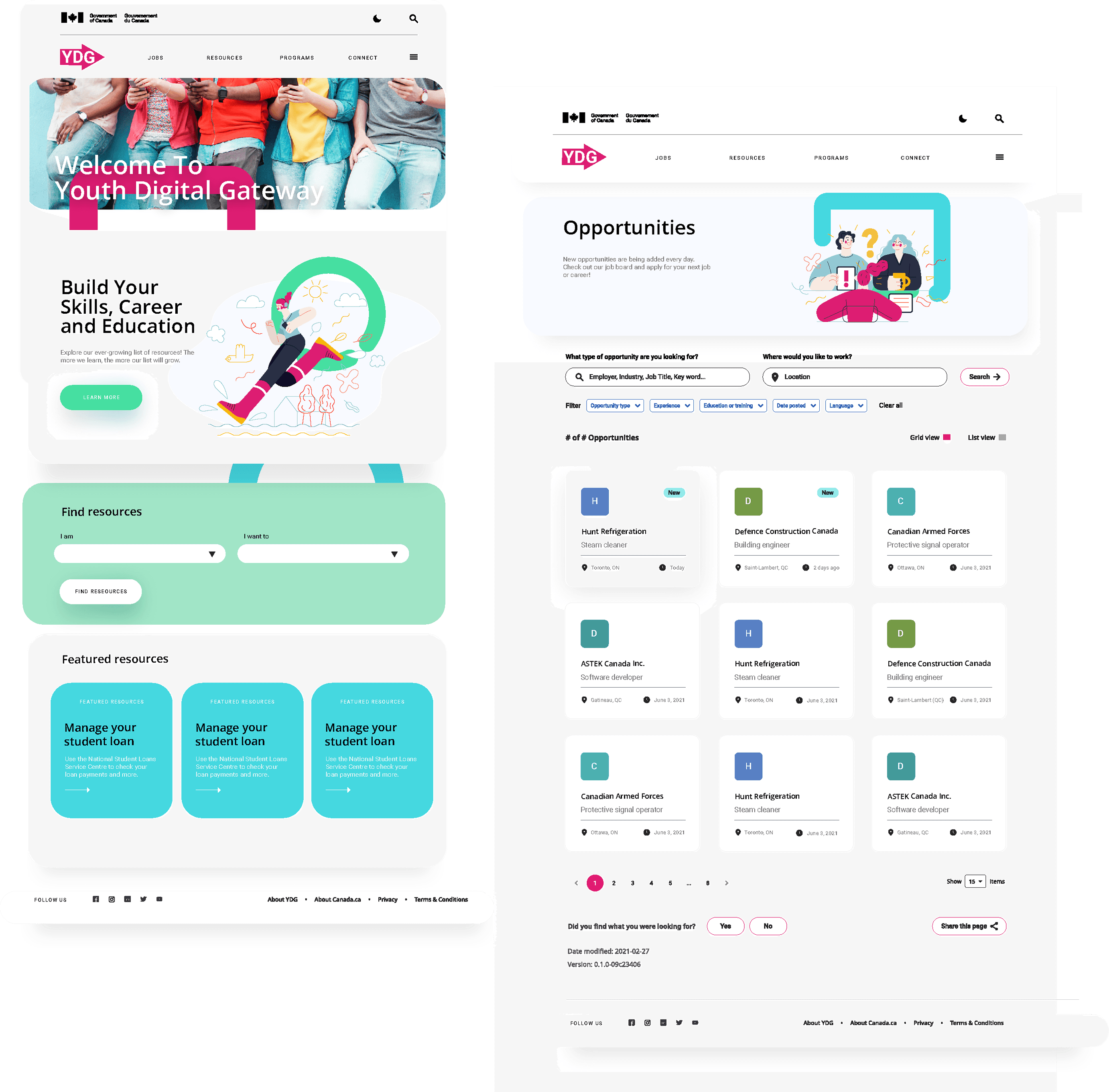
Youth Digital Gateway - Landing page and Opportunity page

Youth Digital Gateway - Branding and components
Usability Tests
The usability testing process for Youth Digital Gateway was conducted in two iterative phases to validate the platform’s intuitiveness and engagement for its diverse user base.
Initially, we conducted moderated, task-based sessions with representative users—youth job seekers, educators, and career counselors—to observe how they navigated the low-fidelity prototypes and identify any pain points or confusion in the user flows. Participants were asked to complete key tasks, such as searching for job listings, accessing career resources, and using the educator dashboard. Feedback was gathered through think-aloud protocols and post-session surveys, providing both qualitative insights and quantitative metrics on task completion times and error rates.
Findings
Intuitive Navigation
Although users found the navigation system largely intuitive, there is room to further reduce cognitive load by incorporating additional visual cues and clearer labels to guide users seamlessly through the platform.
UI Consistency
Feedback revealed minor inconsistencies in button placement, labeling, and spacing; standardizing these elements and applying uniform design guidelines can further enhance overall coherence.
Overall Engagement & Accessibility
Despite positive reception, some users indicated that additional interactive elements and improved mobile performance would make the platform even more engaging and accessible, suggesting further optimization for diverse user needs.
Dashboard & Content Organization
While the dashboard was well-received, educators and counselors suggested enhancing content organization with more prominent visual indicators and hierarchical cues to improve clarity and streamline information access.
Task Efficiency
Users were able to complete key actions efficiently, but refining certain workflows to eliminate unnecessary steps and improve responsiveness could further boost efficiency and reduce completion times.
Conclusion
The Youth Digital Gateway project concluded with a modern, user-centered digital platform that significantly enhanced the overall user experience for youth, educators, and administrators.
Post-launch metrics indicated a 30% increase in task completion efficiency, a 25% reduction in support queries, and an overall user satisfaction rating of 90%. Additionally, adoption rates among educational institutions and community organizations rose by 40%, underscoring the platform's improved accessibility and intuitive design.
These success metrics demonstrate that our streamlined design process and data-driven approach not only modernized the visual language and interaction flows but also effectively addressed the diverse needs of the target audience, making Youth Digital Gateway a critical tool for promoting youth engagement and career readiness.

Adoption rates among educational institutions and community organizations rose by 40%

25% reduction in support queries

30% increase in task completion efficiency

1 year later
The Youth Digital Gateway (YDG) has garnered positive attention for its role in supporting youth employment and skills development in Canada. As a user-first initiative, the YDG simplifies access to tools, resources, and programs for individuals aged 15 to 30, aiding them in achieving their employment, skills development, learning, and volunteering goals.
In the fiscal year 2021-2022, the YDG was implemented to provide core information technology services for the Canada Service Corps, serving as a digital channel for services and tools that support youth employment and skills development.
Additionally, the YDG features success stories from Indigenous Labour Market Programs, highlighting traditional practices and triumphs of Indigenous individuals, thereby promoting diverse pathways to skill-building and employment. Youth Canada.
These initiatives underscore the YDG's commitment to enhancing digital engagement and providing accessible resources for Canadian youth.

125% increase in appointment requests

30% increase in physician page views
